<?xml version="1.0" encoding="utf-8"?><feed xmlns="http://www.w3.org/2005/Atom" ><generator uri="https://jekyllrb.com/" version="3.10.0">Jekyll</generator><link href="https://sbenson09.github.io/feed.xml" rel="self" type="application/atom+xml" /><link href="https://sbenson09.github.io/" rel="alternate" type="text/html" /><updated>2025-05-01T02:42:06+00:00</updated><id>https://sbenson09.github.io/feed.xml</id><title type="html">Sean’s blog</title><subtitle>Capturing my work as a security engineer.</subtitle><author><name>Sean Benson</name></author><entry><title type="html">Triggering Immediate Check-ins with Fleet Automations</title><link href="https://sbenson09.github.io/2025/04/30/triggering-check-in-after-fleet-policy-automation/" rel="alternate" type="text/html" title="Triggering Immediate Check-ins with Fleet Automations" /><published>2025-04-30T00:00:00+00:00</published><updated>2025-04-30T00:00:00+00:00</updated><id>https://sbenson09.github.io/2025/04/30/triggering-check-in-after-fleet-policy-automation</id><content type="html" xml:base="https://sbenson09.github.io/2025/04/30/triggering-check-in-after-fleet-policy-automation/"><![CDATA[<p>A common pattern in endpoint configuration management is to audit a system for a desired state, and if a system deviates from this state, trigger remediation to bring it back into compliance.</p>

<p>This is how we handle almost all of our endpoint configuration management, powered through use of Jamf’s Extension Attributes, Smart Groups, and Policies. The moving parts look something like this:</p>

<ol>
  <li>Update Inventory job runs recurringly on computers, triggering Extension Attribute evaluation.</li>
  <li>An Extension Attribute script runs on the computer to evaluate for desired state, and returns a Pass / Fail value to Jamf.</li>
  <li>Computers with a Fail value in that Extension Attribute are automatically added to a corresponding Smart Group.</li>
  <li>A Policy is scoped to the Smart Group, which attempts to remediate the problem, and then executes the “Update Inventory” payload.</li>
</ol>

<p>While this works well enough, the mean time-to-detect and time-to-remediate tends to be pretty delayed, since both the execution of the Extension Attribute script and Policy will not trigger until an “Update Inventory” job is run, which we currently only run once a day, save for manual <code class="language-plaintext highlighter-rouge">jamf recon</code> invocations. Further compounding the delay, Smart Group membership updates may happen after an Update Inventory job, meaning remediation policies often require an additional inventory cycle before they execute.</p>

<p>In practice, it can end up taking up to two days before a given deviation is detected and remediated.</p>

<h2 id="doing-things-with-fleet">Doing things with Fleet</h2>

<p>We’ve been using <a href="https://fleetdm.com/">Fleet</a>, and have begun evaluating their Premium offering. One of the features in Premium is the ability to run <a href="https://fleetdm.com/guides/automations#policy-automations">automations</a> upon the detection of a failing policy. Of particular interest to us, is the ability for it to run a script automatically. Much like how Jamf’s policy works, we can use this to remediate deviations.</p>

<p>The cool thing about this is that unlike Jamf, which requires you to orchestrate Jamf to trigger the remediation as described above, Fleet automatically executes the policy automation basically immediately. Assuming the computer is online, this means that detection to remediation is roughly 30 minutes, the default check in cadence for the Fleet agent.</p>

<p>However, while the remediation may actually be applied within those 30 minutes, the policy will continue to show as unhealthy until the <em>next</em> time the Fleet agent checks in. Unfortunately, there is currently no built-in way to make Fleet check for policy state upon a policy automation being triggered.</p>

<p>Fortunately, there <em>is</em> a workaround!</p>

<h2 id="automatically-triggering-fleet-check-ins-after-remediation">Automatically triggering Fleet check-ins after remediation</h2>

<p>While Fleet offers no built-in way to trigger a check in after a policy automation, we <em>can</em> do this programmatically, by appending check in logic at the end of every script triggered by a policy automation. But there is no command-line equivalent to <code class="language-plaintext highlighter-rouge">jamf recon</code>.</p>

<p>Instead, we can easily accomplish this via Fleet’s API, which provides a <a href="https://github.com/fleetdm/fleet/blob/004027cca26546a112ba8cede25019500a8d1ea8/docs/Contributing/API-for-contributors.md#refetch-devices-host">refetch device’s host route</a>.</p>

<p>This request is authenticated using a device’s token, which means most of our concerns around how we’ll handle authentication are addressed. However, the device’s token is only made available on the device if the agent was installed with <a href="https://fleetdm.com/guides/fleet-desktop">fleet-desktop</a>, so if your fleet agent was not installed with this, you’ll need to rebuild your installer and reinstall.</p>

<p>Once the device token is available (by default, it should exist at <code class="language-plaintext highlighter-rouge">/opt/orbit/identifier</code>), you should be able to simply make a POST request to the endpoint using curl at the end of any given script.</p>

<div class="language-bash highlighter-rouge"><div class="highlight"><pre class="highlight"><code><span class="nv">DEVICE_TOKEN</span><span class="o">=</span><span class="si">$(</span><span class="nb">cat</span> /opt/orbit/identifier<span class="si">)</span>
<span class="nv">FLEET_URL</span><span class="o">=</span><span class="s1">'https://your-fleet-url.com'</span>
curl <span class="nt">-X</span> POST <span class="s2">"</span><span class="k">${</span><span class="nv">FLEET_URL</span><span class="k">}</span><span class="s2">/api/latest/fleet/device/</span><span class="k">${</span><span class="nv">DEVICE_TOKEN</span><span class="k">}</span><span class="s2">/refetch"</span> <span class="se">\</span>
  <span class="nt">-H</span> <span class="s2">"Content-Type: application/json"</span>

<span class="nb">exit </span>0
</code></pre></div></div>

<p>This way, the Fleet agent will automatically check in after a policy automation runs. 🎉</p>

<p>It would be great if Fleet did this natively! To that end, I submit a feature request <a href="https://github.com/fleetdm/fleet/issues/28523">here</a>.</p>

<h2 id="considerations">Considerations</h2>

<h3 id="fleet-desktop-dependency">Fleet Desktop Dependency:</h3>
<p>Unfortunately, this depends on Fleet Desktop being installed on the computer, which ensures the device token is populated. Without this, you’d need to generate an API token and expose it on the endpoint. I don’t really recommend this.</p>

<h3 id="potential-for-multiple-refetch-calls">Potential for multiple refetch calls:</h3>
<p>If you did use this pattern across all your policies, and you had a lot of policies that fail at once, it’s possible you could end up triggering the <code class="language-plaintext highlighter-rouge">refetch</code> job <em>a lot</em>. I don’t know if this’ll have any negative repercussions, but if Fleet were to implement this capability natively, I’d recommend they call a single <code class="language-plaintext highlighter-rouge">refetch</code> only after all policy automation jobs are completed.</p>

<h3 id="increasing-jamf-inventory-update-frequency-as-an-alternative">Increasing Jamf Inventory Update frequency as an alternative:</h3>

<p>You could! Unfortunately, Jamf’s Update Inventory job is triggered via a Policy, and Policy scheduling is not very granular. Outside of setting this to “Ongoing”, where it’ll run every time it checks in, the shortest recurring interval is “Once every day”.</p>

<p>You <em>could</em> shorten the interval by orchestrating the Update Inventory job outside of Jamf; for example, using a custom event trigger or running <code class="language-plaintext highlighter-rouge">jamf recon</code> via cron. But personally, I don’t think the added complexity is worth it.</p>]]></content><author><name>Sean Benson</name></author><summary type="html"><![CDATA[A common pattern in endpoint configuration management is to audit a system for a desired state, and if a system deviates from this state, trigger remediation to bring it back into compliance.]]></summary></entry><entry><title type="html">Monitoring Jamf Pro with Fleet</title><link href="https://sbenson09.github.io/2025/04/25/monitoring_jamf_pro_with_fleet/" rel="alternate" type="text/html" title="Monitoring Jamf Pro with Fleet" /><published>2025-04-25T00:00:00+00:00</published><updated>2025-04-25T00:00:00+00:00</updated><id>https://sbenson09.github.io/2025/04/25/monitoring_jamf_pro_with_fleet</id><content type="html" xml:base="https://sbenson09.github.io/2025/04/25/monitoring_jamf_pro_with_fleet/"><![CDATA[<p>We use Jamf Pro as our MDM, and our main means of configuration management for our macOS endpoints. Most of the time, this works very well, but occasionally we’ve observed failures between the jamf agent installed on the endpoint, and the Jamf server, resulting in the agent failing to check in for prolonged periods of time. This has significant knock-on effects: if the jamf agent isn’t working on a system, other things start to fall apart.</p>

<p>One of the challenges in fixing this was that we were wholly dependent on Jamf for measuring and managing the states of our endpoints. To monitor Santa, our EDR, our zero-trust VPN, or any of the other various things we’d monitor on a system, Jamf is enough! But Jamf can’t monitor itself; if the jamf agent is broken on a system, it can’t report anything back.</p>

<p>This was one of the biggest reasons we wanted to deploy Fleet in our environment: Fleet would give us the ability to automatically identify and (potentially) remediate broken jamf agents.</p>

<p>Fleet has a vast number of osquery tables at its disposal, but unfortunately, none of them are directly relevant to understanding the state of the jamf agent and specifically, whether or not the jamf agent has recently checked in. Fleet <em>does</em> come with some capabilities to read certain filetypes or content from disk (e.g. <a href="https://fleetdm.com/tables/plist#apple">plist</a>, <a href="https://fleetdm.com/tables/parse_json#apple">json</a>, etc.), but as far as I know, there’s nothing on the filesystem that will give us the information we need in a way Fleet will natively understand. <em>However</em>, there is something of use on the filesystem we’ll be able to use!</p>

<h2 id="parsing-the-varlogjamflog">Parsing the /var/log/jamf.log</h2>

<p>By default, the jamf agent writes its logs to the <code class="language-plaintext highlighter-rouge">/var/log/jamf.log</code>. To figure out what log entries were most common, I put a quick script together to parse and sort them:</p>
<div class="language-bash highlighter-rouge"><div class="highlight"><pre class="highlight"><code><span class="c">#!/bin/bash</span>

<span class="c"># Usage: ./script.sh logfile.log</span>

<span class="k">if</span> <span class="o">[</span> <span class="nt">-z</span> <span class="s2">"</span><span class="nv">$1</span><span class="s2">"</span> <span class="o">]</span><span class="p">;</span> <span class="k">then
    </span><span class="nb">echo</span> <span class="s2">"Usage: </span><span class="nv">$0</span><span class="s2"> [logfile]"</span>
    <span class="nb">exit </span>1
<span class="k">fi

</span><span class="nb">sed</span> <span class="nt">-E</span> <span class="s1">'s/^.*jamf\[[0-9]+\]: //'</span> <span class="s2">"</span><span class="nv">$1</span><span class="s2">"</span> | <span class="nb">sort</span> | <span class="nb">uniq</span> <span class="nt">-c</span> | <span class="nb">sort</span> <span class="nt">-nr</span>
</code></pre></div></div>

<p>This returns output like this:</p>
<div class="language-plaintext highlighter-rouge"><div class="highlight"><pre class="highlight"><code>6407 Checking for policies triggered by "recurring check-in" for user "sbenson"...
6358 Checking for patches...
6352 No patch policies were found.
 556 Removing existing launchd task /Library/LaunchDaemons/com.jamfsoftware.task.bgrecon.plist...
 184 Executing Policy Update Jamf Inventory
 184 Executing Policy Assign User Information to Device
 [etc.]
</code></pre></div></div>
<p>This gives us a great sense of what would be a reliable indicator for a healthy jamf agent. In particular, looking for lines containing <code class="language-plaintext highlighter-rouge">No patch policies were found</code> or <code class="language-plaintext highlighter-rouge">Executing Policy</code> will be great for our purposes, because it suggests the agent is communicating with the server, and they are frequently represented in our log. This means that if we have logs where these lines don’t show up, it’s a good indicator the jamf agent isn’t working.</p>

<p>However, in its current form, Fleet won’t be able to parse this log file. To work around that, we can leverage a Jamf extension attribute to deploy a script that periodically runs on the endpoint, to parse the log, identify the latest timestamp associated with a log entry that corresponds with successful communication between the jamf agent and Jamf server, and then write that timestamp to disk in a format Fleet will be able to use.</p>

<p>The following script should suffice:</p>
<div class="language-bash highlighter-rouge"><div class="highlight"><pre class="highlight"><code><span class="c">#!/bin/bash</span>
<span class="c"># Jamf EA: last_successful_checkin </span>
<span class="c">#</span>
<span class="c">#  Returns one of:</span>
<span class="c">#    • 2025-04-25T09:21:38Z  (success stamp)</span>
<span class="c">#    • no_success</span>
<span class="c">#    • no_log</span>
<span class="c">#</span>
<span class="c">#  On success: writes JSON file for Fleet.</span>
<span class="c">#  On failure: leaves the prior JSON untouched.</span>

<span class="c"># config</span>
<span class="nv">LOGS</span><span class="o">=(</span>/private/var/log/jamf.log<span class="k">*</span><span class="o">)</span> <span class="c"># includes rotated logs</span>
<span class="nv">DIR</span><span class="o">=</span><span class="s2">"/opt/telemetry/jamf"</span>
<span class="nv">FILE</span><span class="o">=</span><span class="s2">"</span><span class="k">${</span><span class="nv">DIR</span><span class="k">}</span><span class="s2">/last_checkin"</span>
<span class="nv">SUCCESS</span><span class="o">=</span><span class="s1">'Executing Policy|No patch policies were found|No policies were found|Submitting log to'</span> <span class="c"># Log items indicating success</span>

<span class="k">if</span> <span class="o">[[</span> <span class="o">!</span> <span class="nt">-d</span> <span class="s2">"</span><span class="nv">$DIR</span><span class="s2">"</span> <span class="o">]]</span><span class="p">;</span> <span class="k">then</span>
  /usr/bin/install <span class="nt">-d</span> <span class="nt">-o</span> root <span class="nt">-g</span> wheel <span class="nt">-m</span> 700 <span class="s2">"</span><span class="nv">$DIR</span><span class="s2">"</span>
<span class="k">fi

</span><span class="nb">shopt</span> <span class="nt">-s</span> nullglob <span class="c"># glob silently to an empty list if no match</span>
<span class="k">if</span> <span class="o">((</span> <span class="k">${#</span><span class="nv">LOGS</span><span class="p">[@]</span><span class="k">}</span> <span class="o">==</span> 0 <span class="o">))</span><span class="p">;</span> <span class="k">then
  </span><span class="nb">echo</span> <span class="s2">"&lt;result&gt;no_log&lt;/result&gt;"</span>
  <span class="nb">exit </span>0
<span class="k">fi</span>

<span class="c"># locate most‑recent successful line</span>
<span class="nv">ts_line</span><span class="o">=</span><span class="si">$(</span><span class="nb">grep</span> <span class="nt">-aE</span> <span class="s2">"</span><span class="nv">$SUCCESS</span><span class="s2">"</span> <span class="s2">"</span><span class="k">${</span><span class="nv">LOGS</span><span class="p">[@]</span><span class="k">}</span><span class="s2">"</span> | <span class="nb">tail</span> <span class="nt">-1</span><span class="si">)</span>

<span class="k">if</span> <span class="o">[[</span> <span class="nt">-z</span> <span class="s2">"</span><span class="nv">$ts_line</span><span class="s2">"</span> <span class="o">]]</span><span class="p">;</span> <span class="k">then
  </span><span class="nb">echo</span> <span class="s2">"&lt;result&gt;no_success&lt;/result&gt;"</span>
  <span class="nb">exit </span>0
<span class="k">fi</span>

<span class="c"># convert timestamp</span>
<span class="nv">ts</span><span class="o">=</span><span class="si">$(</span><span class="nb">awk</span> <span class="s1">'{print $2" "$3" "$4}'</span> <span class="o">&lt;&lt;&lt;</span><span class="s2">"</span><span class="nv">$ts_line</span><span class="s2">"</span><span class="si">)</span> <span class="c"># e.g. Apr 25 09:21:38</span>
<span class="nv">epoch</span><span class="o">=</span><span class="si">$(</span><span class="nb">date</span> <span class="nt">-j</span> <span class="nt">-f</span> <span class="s2">"%b %d %T"</span> <span class="s2">"</span><span class="nv">$ts</span><span class="s2">"</span> <span class="s2">"+%s"</span><span class="si">)</span> <span class="o">||</span> <span class="nb">exit </span>0
<span class="nv">iso</span><span class="o">=</span><span class="si">$(</span><span class="nb">date</span> <span class="nt">-u</span> <span class="nt">-r</span> <span class="s2">"</span><span class="nv">$epoch</span><span class="s2">"</span> <span class="s2">"+%Y-%m-%dT%H:%M:%SZ"</span><span class="si">)</span>

<span class="c"># write JSON for Fleet</span>
<span class="nb">printf</span> <span class="s1">'{"last_successful_checkin":"%s"}\n'</span> <span class="s2">"</span><span class="nv">$iso</span><span class="s2">"</span> <span class="o">&gt;</span> <span class="s2">"</span><span class="nv">$FILE</span><span class="s2">"</span>
<span class="nb">chown </span>root:wheel <span class="s2">"</span><span class="nv">$FILE</span><span class="s2">"</span>
<span class="nb">chmod </span>600 <span class="s2">"</span><span class="nv">$FILE</span><span class="s2">"</span>

<span class="c"># return ISO stamp to Jamf</span>
<span class="nb">echo</span> <span class="s2">"&lt;result&gt;</span><span class="nv">$iso</span><span class="s2">&lt;/result&gt;"</span>
</code></pre></div></div>

<p>This should result in a file at <code class="language-plaintext highlighter-rouge">/opt/telemetry/jamf/last_checkin</code> with the latest timestamp stored in json.</p>

<p>Extension attributes are generally used to capture data from the device in Jamf Pro, but in this case we don’t really need to do that. Jamf already does capture a device’s last check-in time anyway. Instead, I opt to capture whether or not the script ran into errors, for easier troubleshooting in the future.</p>

<h2 id="using-fleet-to-monitor">Using Fleet to Monitor</h2>

<p>Now that the data we need is available and in a format Fleet can work with, using it is pretty simple. Here’s a sample query and policy:</p>

<p>Query:</p>

<pre><code class="language-SQL">SELECT *
FROM parse_json
WHERE
    path = '/opt/telemetry/jamf/last_checkin' AND
    key = 'last_successful_checkin'
</code></pre>

<p>Policy (Pass if last checkin is less than 14 days ago):</p>

<pre><code class="language-SQL">SELECT 1
FROM parse_json
WHERE
    path = '/opt/telemetry/jamf/last_checkin' AND
    key = 'last_successful_checkin' AND
    datetime(value) &gt; datetime('now', '-14 days')
</code></pre>

<p>In our case, we leverage something like this as a component in a much larger query &amp; policy, which also looks at other data points relevant to the health of Jamf on our endpoints (e.g. presence of relevant .Apps, Configuration Profiles, LaunchDaemons, etc.)</p>

<h2 id="remediation">Remediation</h2>

<p>Once we detect a broken jamf agent, we need to actually fix it. To do this, we’ve been leveraging <a href="https://github.com/sbenson09/jamf-self-heal">a self-heal script I made</a>, inspired by a post I read by a <code class="language-plaintext highlighter-rouge">Dr. K</code> at <a href="https://www.modtitan.com/2022/02/jamf-binary-self-heal-with-jamf-api.html">modtitan.com</a>. The TL;DR is the script makes a request to the Jamf API to use MDM to redeploy the Jamf management framework on the computer specified.</p>

<p>We run this script manually, as running it automatically would mean exposure of our API credentials on our endpoints, which we want to avoid.</p>

<h2 id="other-considerations">Other Considerations</h2>

<h4 id="isnt-last-check-in-already-present-in-jamf-pros-web-ui">Isn’t last check-in already present in Jamf Pro’s web UI?</h4>

<p>It is! But the issue is that Jamf has no way of knowing if the computer is actually on or not.</p>

<p>So, sometimes a jamf agent that hasn’t checked in for 20 days means the agent is broken, while other times, it means the owner has been on vacation.</p>

<p>The above approach works because if Jamf log doesn’t show recent check in, but Fleet is able to communicate with the device, then it means the device is online, and something is wrong with the jamf agent.</p>

<h4 id="what-about-false-positives">What about false positives?</h4>

<p>Our strategy with Fleet is to really dial in our policies, such that we can alert on them when they fail and action needs to be taken. To that end, minimizing false positives is vital.</p>

<p>In its current state, we may run into a race condition, where if a computer that has been powered off for a long period of time is powered on, and Fleet evaluates its policy before the jamf agent has had the chance to check in, the device will fail our Fleet policy, even though technically the jamf agent is healthy. This has been rare, and ultimately will sort itself out by the next time Fleet re-runs the policy.</p>

<h2 id="future-improvements">Future Improvements</h2>

<h4 id="parse-varlogjamflog-for-explicit-errors">Parse <code class="language-plaintext highlighter-rouge">/var/log/jamf.log</code> for explicit errors</h4>

<p>When I developed this process, it wasn’t clear to me that there was a common root cause across our broken jamf agents. After observing for the last couple months, I’ve seen <code class="language-plaintext highlighter-rouge">Device Signature Error - A valid device signature is required to perform the action.</code> this consistently, so in a future revision, it might make sense for us to take this approach. This should be more reliable and address the race condition described above.</p>

<h4 id="automate-remediation">Automate remediation</h4>

<p>Using Fleet’s policy automations, we could automatically deploy this script locally, and accept the risk of an exposed API credentials. If we scope the permissions of the credentials to a very limited set, the risk is pretty low.</p>

<p>As an alternative, we could leverage Fleet’s policy automations to instead fire a webhook, which could trigger a cloud function to run the self-heal script instead. Doing things this way would help us keep the API token from being exposed on endpoints.</p>

<h1 id="conclusion">Conclusion</h1>

<p>This approach has been working well for us as a lightweight safety net around Jamf’s self-awareness gap. It’s simple, low-risk, and integrates seamlessly with our existing observability in Fleet.</p>]]></content><author><name>Sean Benson</name></author><summary type="html"><![CDATA[We use Jamf Pro as our MDM, and our main means of configuration management for our macOS endpoints. Most of the time, this works very well, but occasionally we’ve observed failures between the jamf agent installed on the endpoint, and the Jamf server, resulting in the agent failing to check in for prolonged periods of time. This has significant knock-on effects: if the jamf agent isn’t working on a system, other things start to fall apart.]]></summary></entry><entry><title type="html">Introducing Sean’s blog</title><link href="https://sbenson09.github.io/2025/04/18/coming_soon/" rel="alternate" type="text/html" title="Introducing Sean’s blog" /><published>2025-04-18T00:00:00+00:00</published><updated>2025-04-18T00:00:00+00:00</updated><id>https://sbenson09.github.io/2025/04/18/coming_soon</id><content type="html" xml:base="https://sbenson09.github.io/2025/04/18/coming_soon/"><![CDATA[<h2 id="this-blog-is-wip">This blog is WIP</h2>

<p>I’ll maintain a write up of random things I come across at work, relating to security, macOS and iOS administration, etc. Come back soon.</p>]]></content><author><name>Sean Benson</name></author><summary type="html"><![CDATA[This blog is WIP]]></summary></entry><entry><title type="html">Re-mapping keys in macOS</title><link href="https://sbenson09.github.io/2025/04/18/remapping_keys_in_macos/" rel="alternate" type="text/html" title="Re-mapping keys in macOS" /><published>2025-04-18T00:00:00+00:00</published><updated>2025-04-18T00:00:00+00:00</updated><id>https://sbenson09.github.io/2025/04/18/remapping_keys_in_macos</id><content type="html" xml:base="https://sbenson09.github.io/2025/04/18/remapping_keys_in_macos/"><![CDATA[<p>Like most people, I’m particular about what’s on my desk, and all of my various tweaks, macros, etc. that I use to make my time working comfortable and productive.</p>

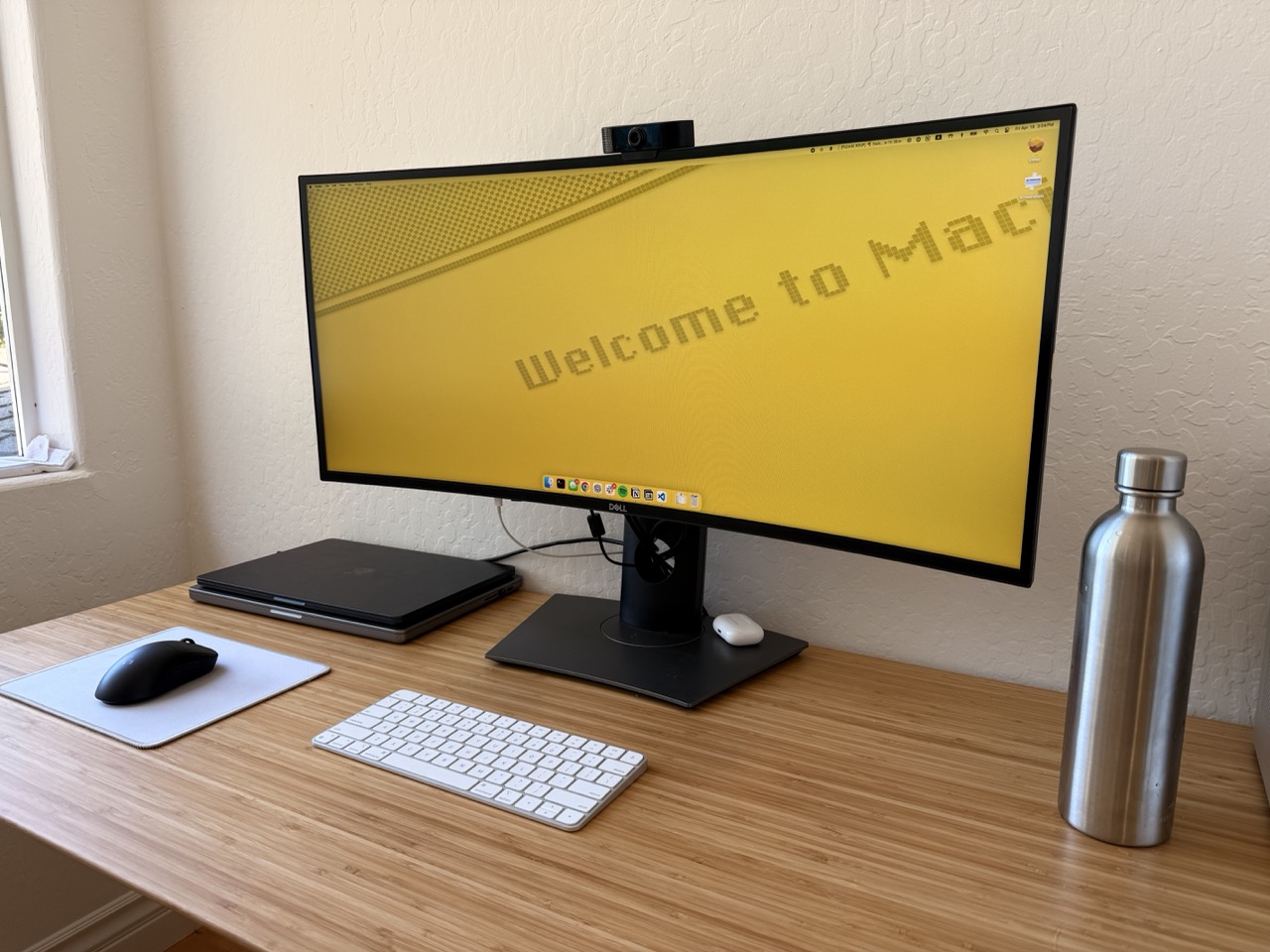
<p>I prefer a pretty spartan setup: a mouse, a keyboard, my computers, and that’s about it. Even then, most things are minimal and out of the way. In this vein, my keyboard of choice for this desk is the <a href="https://www.apple.com/shop/product/MXCL3LL/A/magic-keyboard-usb-c-us-english">Apple Magic Keyboard</a>.</p>

<p><img src="/assets/posts/2025-4-18-remapping-keys/desktop.jpeg" alt="Photo of desktop" /></p>

<p>This keyboard is great for my purposes, although I can understand why it might not be others’ cup of tea. However, one minor gripe I have is that there is no right control key on the keyboard. This is pretty annoying, because since I mouse with my left hand, I typically rely heavily on the right-side control key for switching desktops in macOS. And given that I never use the right option key, it makes a great candidate for mapping to the right control button.</p>

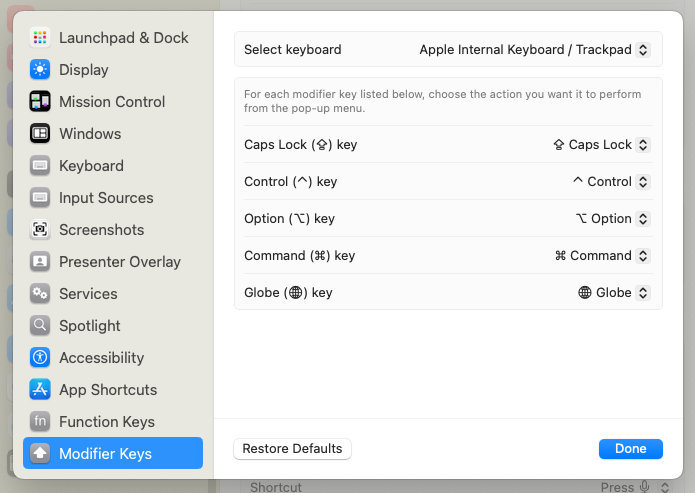
<p>Sadly, Apple <em>does</em> provide a means of mapping modifier keys, but they aren’t specific to individual keys, meaning I can only map <em>both</em> option keys, or none.</p>

<p><img src="/assets/posts/2025-4-18-remapping-keys/keyboard_remapping.png" alt="Keyboard remapping preferences" /></p>

<p>For things like this in the past, I used <a href="https://karabiner-elements.pqrs.org/">Karabiner-Elements</a>, which always worked well, but was definitely way overkill for my needs. This time, I wanted something a little simpler, and something that I’d be able to run across my work computer without requiring a new <a href="https://github.com/northpolesec/santa">Santa</a> (binary authorization) allowlist rule or a <a href="https://karabiner-elements.pqrs.org/docs/getting-started/installation/#allow-system-software-which-provides-virtual-devices-for-karabiner-elements">system extension</a>.</p>

<p>Fortunately, Apple provides an option that fits the bill. From a <a href="https://developer.apple.com/library/archive/technotes/tn2450/_index.html">technical note written in 2017</a>:</p>
<blockquote>
  <p>This Technical Note is for developers of key remapping software so that they can update their software to support macOS Sierra 10.12. We present 2 solutions for implementing key remapping functionality for macOS 10.12 in this Technical Note.</p>
</blockquote>

<p>In that technical note, the two methods they describe are:</p>

<ol>
  <li>Scripting Key Remapping: Using the <code class="language-plaintext highlighter-rouge">hidutil</code> command-line tool</li>
  <li>Programmatic Key Remapping: Using IOKit HID APIs</li>
</ol>

<p>The first method will work perfectly for my use case. According to the Key Table Usages at the bottom, I would need to map the Usage ID of 0xE6 to 0xE0.</p>

<p>Using the example <code class="language-plaintext highlighter-rouge">hidutil</code> command provided, that looks something like this:</p>

<div class="language-bash highlighter-rouge"><div class="highlight"><pre class="highlight"><code>hidutil property <span class="nt">--set</span> <span class="s1">'{"UserKeyMapping":[{"HIDKeyboardModifierMappingSrc":0x7000000E6,"HIDKeyboardModifierMappingDst":0x7000000E0}]}'</span>
</code></pre></div></div>

<p>After running that in my terminal, I was able to confirm this would work.</p>

<p>However, this change will be lost upon reboot. To make this change persistent across reboots, I opted to use a <a href="https://developer.apple.com/library/archive/documentation/MacOSX/Conceptual/BPSystemStartup/Chapters/CreatingLaunchdJobs.html">LaunchAgent</a>, which will issue the <code class="language-plaintext highlighter-rouge">hidutil</code> command upon each login.</p>

<p>To do this, I created <code class="language-plaintext highlighter-rouge">~/Library/LaunchAgents/com.sbenson.remapkeys.plist</code> with the following content:</p>
<div class="language-xml highlighter-rouge"><div class="highlight"><pre class="highlight"><code><span class="cp">&lt;?xml version="1.0" encoding="UTF-8"?&gt;</span>
<span class="cp">&lt;!DOCTYPE plist PUBLIC "-//Apple//DTD PLIST 1.0//EN"
                       "http://www.apple.com/DTDs/PropertyList-1.0.dtd"&gt;</span>
<span class="c">&lt;!-- See https://developer.apple.com/library/archive/technotes/tn2450/_index.html for more on HID key remapping --&gt;</span>

<span class="nt">&lt;plist</span> <span class="na">version=</span><span class="s">"1.0"</span><span class="nt">&gt;</span>
<span class="nt">&lt;dict&gt;</span>
    <span class="nt">&lt;key&gt;</span>Label<span class="nt">&lt;/key&gt;</span>
    <span class="nt">&lt;string&gt;</span>com.sbenson.remapkeys<span class="nt">&lt;/string&gt;</span>

    <span class="nt">&lt;key&gt;</span>ProgramArguments<span class="nt">&lt;/key&gt;</span>
    <span class="nt">&lt;array&gt;</span>
        <span class="nt">&lt;string&gt;</span>/usr/bin/hidutil<span class="nt">&lt;/string&gt;</span>
        <span class="nt">&lt;string&gt;</span>property<span class="nt">&lt;/string&gt;</span>
        <span class="nt">&lt;string&gt;</span>--set<span class="nt">&lt;/string&gt;</span>
        <span class="nt">&lt;string&gt;</span>{"UserKeyMapping":[{"HIDKeyboardModifierMappingSrc":0x7000000E6,"HIDKeyboardModifierMappingDst":0x7000000E0}]}<span class="nt">&lt;/string&gt;</span>
    <span class="nt">&lt;/array&gt;</span>

    <span class="nt">&lt;key&gt;</span>RunAtLoad<span class="nt">&lt;/key&gt;</span>
    <span class="nt">&lt;true/&gt;</span>

    <span class="nt">&lt;key&gt;</span>StandardOutPath<span class="nt">&lt;/key&gt;</span>
    <span class="nt">&lt;string&gt;</span>/tmp/remapkeys.out.log<span class="nt">&lt;/string&gt;</span>

    <span class="nt">&lt;key&gt;</span>StandardErrorPath<span class="nt">&lt;/key&gt;</span>
    <span class="nt">&lt;string&gt;</span>/tmp/remapkeys.err.log<span class="nt">&lt;/string&gt;</span>
<span class="nt">&lt;/dict&gt;</span>
<span class="nt">&lt;/plist&gt;</span>
</code></pre></div></div>

<p>All I did next was reboot and confirm that my changes remained upon login.</p>

<p><a href="mailto:sbenson@hey.com">Let me know if there’s a better way!</a></p>]]></content><author><name>Sean Benson</name></author><summary type="html"><![CDATA[Like most people, I’m particular about what’s on my desk, and all of my various tweaks, macros, etc. that I use to make my time working comfortable and productive.]]></summary></entry></feed>